Stamps PDF pages with text, raster images or another PDF page. More...
#include <pdfsdk/cxx/stamper.h>
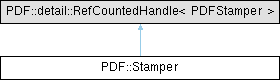
Public Member Functions | |
| void | SetSize (PDFStampSizeMode sizeMode, float a, float b) |
| Sets how the stamp is sized. Overrides the value passed to Create. | |
| void | SetPosition (float horizontalDistance, float verticalDistance, bool usePercentage=false) |
| Sets the offset of the stamp from the alignment anchor. Default is no offset (0, 0). | |
| void | SetAlignment (PDFStampHAlign hAlign, PDFStampVAlign vAlign) |
| Sets the anchor that the position offset is measured from. Default is centered (kPDFStampHAlignCenter, kPDFStampVAlignCenter). | |
| void | SetRotation (float degrees) |
| Sets the rotation of the stamp, in degrees, counter-clockwise. Default is 0 (no rotation). | |
| void | SetOpacity (float opacity) |
| Sets the opacity of the stamp. | |
| void | SetAsBackground (bool background) |
| Specifies whether the stamp is placed behind the page content (background) or on top. Default is on top (foreground). | |
| void | SetAsAnnotation (bool annotation) |
| Specifies whether the stamp is added as a Stamp annotation instead of page content. Default is page content. | |
| void | ShowsOnScreen (bool onScreen) |
| Specifies whether the stamp is visible on screen. Default is true. | |
| void | ShowsOnPrint (bool onPrint) |
| Specifies whether the stamp is visible when the document is printed. Default is true. | |
| void | ShowsInLayersPanel (bool inLayersPanel) |
| Specifies whether the stamp's optional-content layer is registered in the document's layer order (/Order) so it appears in a viewer's layers panel. Default is false. | |
| void | SetName (const std::wstring &name) |
| Sets the stamp name. Default is "Stamp". | |
| void | SetFont (const PDFontInfo &fontInfo) |
| Sets the font used for text stamps. | |
| void | SetFontColor (PDColorValue color) |
| Sets the color used for text stamps. | |
| void | SetTextOutline (PDColorValue strokeColor, float strokeWidth) |
| Gives text stamps an outline (stroke), in addition to or instead of the fill. | |
| void | SetTextAlignment (PDFStampTextAlign textAlign) |
| Sets the alignment of multi-line text within a text stamp. Default is kPDFStampTextAlignLeft. | |
| void | StampText (const Document &destDoc, const std::wstring &text, const std::vector< size_t > &destPages={}) |
| Stamps text onto the given pages using the configured font, color and text alignment. | |
| void | StampImage (const Document &destDoc, const Graphics::Bitmap &bitmap, const std::vector< size_t > &destPages={}) |
| Stamps a raster image from an in-memory bitmap onto the given pages. | |
| void | StampImageFromFile (const Document &destDoc, const std::filesystem::path &imagePath, const std::vector< size_t > &destPages={}) |
| Stamps a raster image loaded from a file onto the given pages. | |
| void | StampPage (const Document &destDoc, const Document &srcDoc, size_t srcPageIndex, const std::vector< size_t > &destPages={}) |
| Stamps a single page from a source PDF document (as vector art) onto the given pages. | |
Static Public Member Functions | |
| static Stamper | Create (PDFStampSizeMode sizeMode, float a, float b) |
| Creates a new Stamper with an initial size. | |
| static bool | HasStamps (const Document &doc, const std::vector< size_t > &pages={}) |
| Reports whether any of the given pages contains at least one stamp. | |
| static void | DeleteStamps (const Document &doc, const std::vector< size_t > &pages={}) |
| Deletes all stamps from the given pages. | |
Detailed Description
Stamps PDF pages with text, raster images or another PDF page.
A Stamper is a configuration object: set the size, position, alignment, rotation and opacity once, then call one of the Stamp* methods repeatedly to apply the stamp to a set of pages. Stamped content is wrapped in a standard PDF marked-content artifact so it can be located and removed later via HasStamps / DeleteStamps.
For full control over PDF content creation use the Element / Content API instead.
Member Function Documentation
◆ Create()
|
inlinestatic |
Creates a new Stamper with an initial size.
- Parameters
-
[in] sizeMode How the stamp is sized.
- See also
- PDFStampSizeMode
- Parameters
-
[in] a The horizontal size component. Meaning depends on sizeMode. [in] b The vertical size component. Meaning depends on sizeMode.
◆ DeleteStamps()
|
inlinestatic |
Deletes all stamps from the given pages.
- Parameters
-
[in] doc The document to delete stamps from. [in] pages The zero-based page indices to delete stamps from. Empty means all pages.
- Note
- Only content stamps are removed; annotation stamps (SetAsAnnotation) are not.
◆ HasStamps()
|
inlinestatic |
Reports whether any of the given pages contains at least one stamp.
- Parameters
-
[in] doc The document to check. [in] pages The zero-based page indices to check. Empty means all pages.
- Returns
- True if at least one stamp is found.
- Note
- Only content stamps are detected; annotation stamps (SetAsAnnotation) are not.
◆ SetAlignment()
|
inline |
Sets the anchor that the position offset is measured from. Default is centered (kPDFStampHAlignCenter, kPDFStampVAlignCenter).
- Parameters
-
[in] hAlign Horizontal anchor.
- See also
- PDFStampHAlign
- Parameters
-
[in] vAlign Vertical anchor.
- See also
- PDFStampVAlign
◆ SetAsAnnotation()
|
inline |
Specifies whether the stamp is added as a Stamp annotation instead of page content. Default is page content.
Annotation stamps are not affected by SetAsBackground and are not found or removed by HasStamps / DeleteStamps.
- Parameters
-
[in] annotation If true, the stamp is added as a Stamp annotation; otherwise into the page content.
◆ SetAsBackground()
|
inline |
Specifies whether the stamp is placed behind the page content (background) or on top. Default is on top (foreground).
- Parameters
-
[in] background If true, the stamp is inserted as a background layer; otherwise on top.
- Note
- Ignored for annotation stamps (SetAsAnnotation).
◆ SetFont()
|
inline |
Sets the font used for text stamps.
- Parameters
-
[in] fontInfo The font description (family, format, style).
- See also
- PDFontInfo
- Note
- When left unset, text stamps default to kPDAtom_Helvetica with kPDFontStyleRegular in black.
- The font size is controlled by SetSize with kPDFStampSizeFontSize.
◆ SetFontColor()
|
inline |
Sets the color used for text stamps.
- Parameters
-
[in] color The font color.
- See also
- PDColorValue
- Note
- When left unset, text stamps default to black.
◆ SetName()
|
inline |
Sets the stamp name. Default is "Stamp".
Used as the annotation title for annotation stamps, and as the optional content layer name for content stamps whose screen/print visibility is restricted.
- Parameters
-
[in] name The name.
◆ SetOpacity()
|
inline |
Sets the opacity of the stamp.
- Parameters
-
[in] opacity The opacity in the range [0, 1], where 1 is fully opaque. Default is 1.
◆ SetPosition()
|
inline |
Sets the offset of the stamp from the alignment anchor. Default is no offset (0, 0).
- Parameters
-
[in] horizontalDistance Horizontal offset from the left/right/center anchor. [in] verticalDistance Vertical offset from the top/bottom/center anchor. [in] usePercentage If true, the distances are fractions of the crop box width/height; if false, they are measured in points.
◆ SetRotation()
|
inline |
Sets the rotation of the stamp, in degrees, counter-clockwise. Default is 0 (no rotation).
- Parameters
-
[in] degrees The rotation in degrees.
◆ SetSize()
|
inline |
Sets how the stamp is sized. Overrides the value passed to Create.
- Parameters
-
[in] sizeMode How the stamp is sized.
- See also
- PDFStampSizeMode
- Parameters
-
[in] a The horizontal size component. Meaning depends on sizeMode. [in] b The vertical size component. Meaning depends on sizeMode.
◆ SetTextAlignment()
|
inline |
Sets the alignment of multi-line text within a text stamp. Default is kPDFStampTextAlignLeft.
- Parameters
-
[in] textAlign The text alignment.
- See also
- PDFStampTextAlign
◆ SetTextOutline()
|
inline |
Gives text stamps an outline (stroke), in addition to or instead of the fill.
- Parameters
-
[in] strokeColor The outline (stroke) color, or kPDColorNone to disable the outline (fill only).
- See also
- PDColorValue
- Parameters
-
[in] strokeWidth The outline (stroke) width, in the stamp's coordinate space.
- Note
- With a fill color (SetFontColor) the text is filled and stroked; when the fill is kPDColorNone it is stroked only. When left unset, text stamps are filled only.
◆ ShowsInLayersPanel()
|
inline |
Specifies whether the stamp's optional-content layer is registered in the document's layer order (/Order) so it appears in a viewer's layers panel. Default is false.
- Parameters
-
[in] inLayersPanel If true, the created layer is added to the configuration's /Order.
- Note
- Has effect only for content stamps that create an optional-content layer (restricted visibility); stamps shown both on screen and print create no layer.
◆ ShowsOnPrint()
|
inline |
Specifies whether the stamp is visible when the document is printed. Default is true.
- Parameters
-
[in] onPrint If true, the stamp is printed.
- Note
- Print-time behavior is viewer-dependent (content stamps use optional-content /AS; annotation stamps use the annotation print flag).
◆ ShowsOnScreen()
|
inline |
Specifies whether the stamp is visible on screen. Default is true.
- Parameters
-
[in] onScreen If true, the stamp is shown on screen.
◆ StampImage()
|
inline |
Stamps a raster image from an in-memory bitmap onto the given pages.
- Parameters
-
[in] destDoc The document being stamped. [in] bitmap The image bitmap to stamp. [in] destPages The zero-based page indices to stamp. Empty means all pages.
◆ StampImageFromFile()
|
inline |
Stamps a raster image loaded from a file onto the given pages.
- Parameters
-
[in] destDoc The document being stamped. [in] imagePath The path to the image file (.png .jpg .bmp .gif etc.). [in] destPages The zero-based page indices to stamp. Empty means all pages.
◆ StampPage()
|
inline |
Stamps a single page from a source PDF document (as vector art) onto the given pages.
- Parameters
-
[in] destDoc The document being stamped. [in] srcDoc The source PDF document that contains the page to stamp. [in] srcPageIndex The zero-based index of the source page in srcDoc. [in] destPages The zero-based page indices to stamp. Empty means all pages.
◆ StampText()
|
inline |
Stamps text onto the given pages using the configured font, color and text alignment.
- Parameters
-
[in] destDoc The document being stamped. [in] text The text to stamp. [in] destPages The zero-based page indices to stamp. Empty means all pages.
The documentation for this class was generated from the following file:
- include/pdfsdk/cxx/stamper.h